利用lantern 蓝灯实现浏览器自动翻墙教程
废话不多说,自己下载摸索吧
DOWNLOAD
利用lantern 蓝灯实现浏览器自动翻墙教程
蓝灯运用了多种技术,通过自有服务器或者运行lantern的用户转发流量实现浏览器全自动翻墙。
latern蓝灯和 OpenWrt shadowsocks翻墙的区别
- 蓝灯主要是浏览器自动翻墙
- 路由器OpenWrt shadowsocks翻墙方案 是所有接入的设备都自动翻墙,可定制性更高
为什么选择 lantern 蓝灯翻墙
有很多的翻墙软件,有闭源的,也有开源的,我们优先选择开源软件。闭源软件缺少外界监督,不能保证没有问题。
蓝灯就是优秀的开源翻墙软件。今天是2016-01-10,在Github上已经 6516 Star, 2228 Fork,开发很活跃。
下载 lantern蓝灯翻墙软件
Github下载:
https://github.com/getlantern/lantern
蓝灯翻墙软件安装和设置
停止路由器的shadowsocks翻墙
登录OpenWrt路由器,运行命令:/etc/init.d/shadowsocks stop如果你是按照 https://github.com/softwaredownload/openwrt-fanqiang 设置的翻墙,那么还得检查一下 /etc/init.d/shadowsocks 里的start, stop函数是否正确。2016-01-10前这两个函数有bug,导致执行stop后上网不正常。
打开 Chrome浏览器
安装或运行lantern蓝灯,会自动在Chrome里打开新的页面,地址栏显示了翻墙转发的地址和端口,比如
http://127.0.0.1:16823/
点击打开页面的右下角的齿轮图标设置lantern翻墙配置:

右键点击电脑右下角托盘图标退出lantern(Windows 为例)

如果一切正常,一运行蓝灯,就可以点击蓝灯新打开的页面上的 YouTube 图标看视频了,非常方便。

配置网络软件走 Lantern 翻墙代理:
蓝灯默认会在 127.0.0.1 上开启一个 HTTP 代理,端口号是 8787
在网络软件的代理界面上设置 HTTP 代理:
地址: 127.0.0.1 端口号: 8787(注:“127.0.0.1”表示“本机地址”)
于是,开启Lantern, Dropbox就可以正常使用了: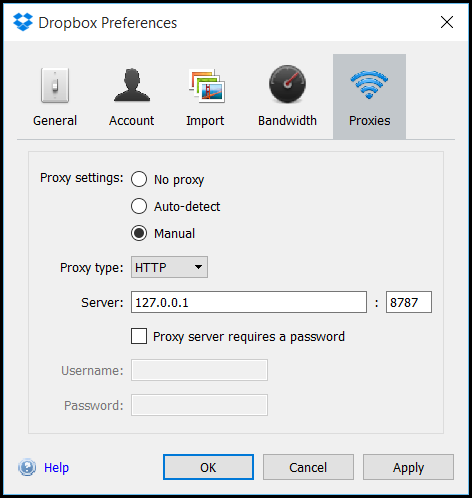
lantern蓝灯翻墙软件配置文件研究
进入lantern蓝灯翻墙软件安装目录:
Windows下进入lantern安装目录
按Windows键,输入
%appdata%
然后就可以进入 Lantern 安装目录。
Mac 下进入lantern安装目录
/Users/name/Library/Application Support/Lantern 配置文件:Lantern/lantern-2.0.10.yaml
2.0.10是版本号,随不同版本而变化。
log 文件,可以了解翻墙详细过程:
Lantern/logs/lantern.log ... geolookup.go:161 Successfully looked up IP '1.0.9.8' and country 'CN' ...Lantern配置文件中的流量转发服务器IP地址
Lantern/lantern-2.0.10.yaml 中找到类似如下内容,替换成其他服务器,把文件设为只读,就可以更换服务器:
fallback-1.0.9.8: addr: 1.0.9.8:443 pipelined: false cert: "-----BEGIN CERTIFICATE-----\n...\n-----END CERTIFICATE-----\n" authtoken: B... https://github.com/softwaredownload/openwrt-fanqiang ...C Ubuntu下自己编译lantern翻墙软件
先准备好Go语言开发环境,假设Go程序的源码在 ~/golib/src 目录下。
sudo apt-get update sudo apt-get install -y git curl libappindicator3-dev build-essential libgtk-3-dev
# Use the Go compiler to build the lantern binary cd ~/golib/src git clone https://github.com/getlantern/lantern.git
cd lantern source setenv.bash go build -o lantern github.com/getlantern/flashlight
# Use curl to test that the proxy is working fine: curl -x 127.0.0.1:8787 https://www.google.com/humans.txt
# This line will run Lantern without opening the browser window: ./lantern -headless